版本一致性是核心
PEG 保存作品,TGP 记录如何修改,REV 将“这条要求通过了”绑定到产生证据的版本。新提交后必须重新审查,旧截图不能替新作品背书。
从“程序能运行”到“画面符合要求”
A Programmable Path to Image and Video Generation。本文把图像与视频生成视为可持续编辑的程序工程:保存作品状态,记录构造过程,用当前版本的视觉证据决定能否交付。真正的研究对象是连接 MLLM、代码、渲染器与验证的 Harness。
PEG 保存作品,TGP 记录如何修改,REV 将“这条要求通过了”绑定到产生证据的版本。新提交后必须重新审查,旧截图不能替新作品背书。
GPT-6-Astra 完成 50/50 图像与 13/13 视频;通过全部外部质量阈值的是 48/50 与 10/13。二者分别是 96.0% 与 76.9%,不是 100% 的视觉可靠性。
实验主要比较同一 Harness 下不同模型;没有移除 PEG、TGP、REV 的受控 ablation。结果展示整套系统能做什么,不能单独估计每个组件带来了多少提升。
来源:§3 / Eqs. 1–4、Table 3、Table 5。本页未运行论文研究实验;所有实验成绩均为作者报告。
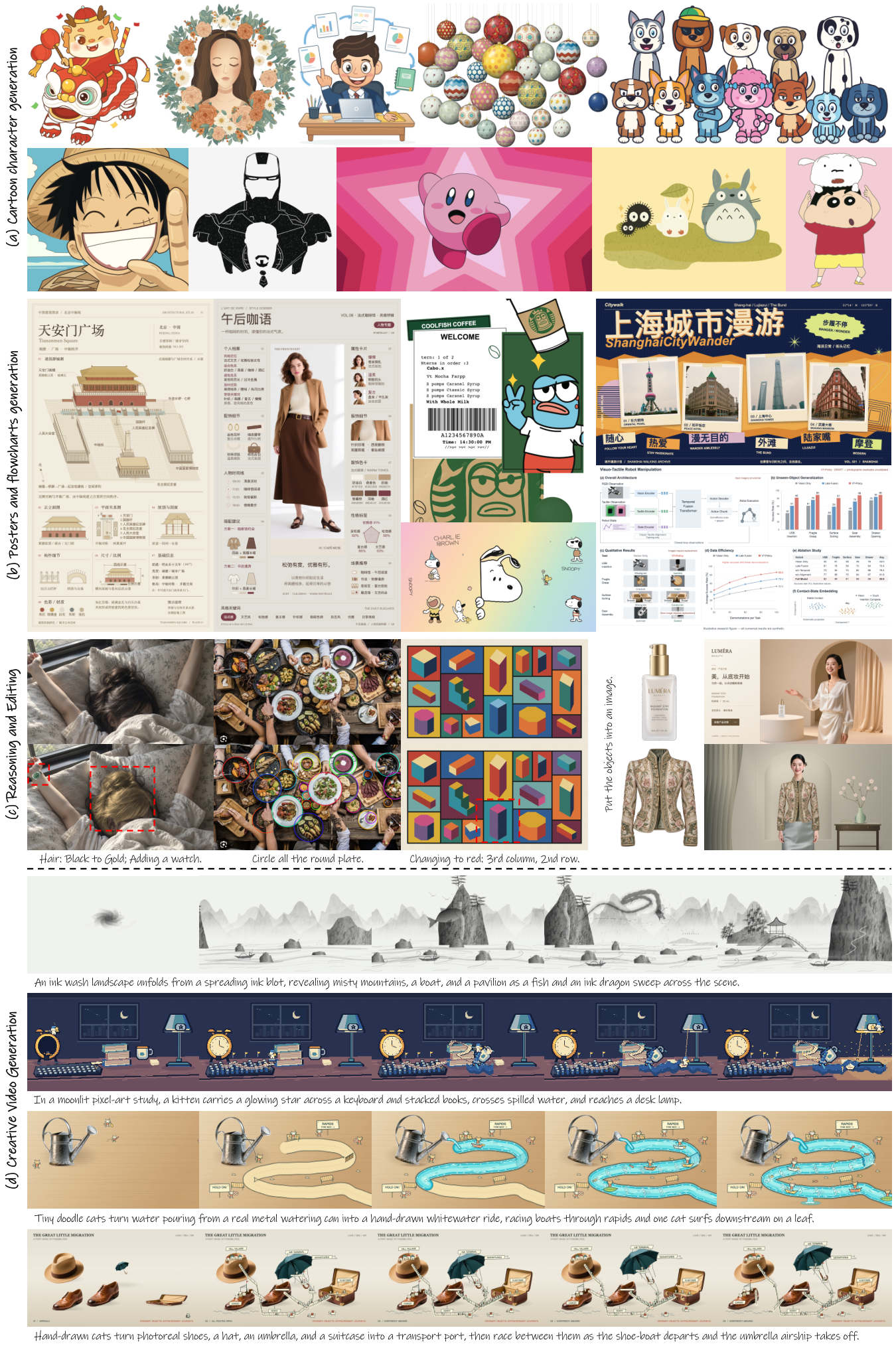
本页依据 v1 的完整正文、参考文献与 Appendix §6.1–6.5,并交叉读取同版本 arXiv HTML、原始 PDF 与固定 commit 官方仓库。PDF 正文至第 14 页,参考文献第 15 页,附录第 16–22 页。作者在 arXiv 上使用 CC BY 4.0:本页中文解释为改写与分析;原 Figure、原始英文 prompt 与表格归原作者,重排、摘录和中文说明不代表作者背书。
| 标签 | 本页含义 | 不能据此声称 |
|---|---|---|
| Paper Verified | 已在原文、公式或表格中核对 | 我们独立复现了这些结果 |
| Author Claim | 作者提出的能力或解释 | 已由独立或因果实验确立 |
| Implementation Audit | 固定公开 commit 的静态代码证据 | 就是生成论文所有结果的历史运行环境 |
| Our Interpretation | 基于已核对材料的解读与算术推导 | 原论文提出了相同公式或结论 |
| Research Extension | 尚待实验的研究设计 | 已实现、已经有效 |
资料可见性缺口会影响复现:公开仓库不含完整历史生成记录、完整评测数据集与论文视觉评分流水线,不能把公开 completion 报告当成 Table 3/5 的 All Criteria 结果。详细差异见代码审计。论文未给出完整历史 system / tool / reviewer prompt,也未给出足以还原所有模型条件的统一推理配置表。
Paper Verified Program-to-Visual Gap 指“程序层面的正确执行”与“用户视觉要求得到满足”之间的差距。例如代码没有报错,但狐狸的脚没有站在杯沿、画笔没有触到杯柄;视频能导出,却把应先发生的动作放到了后面。可运行程序只解决了必要条件,未自动解决语义、空间、外观与时间约束。[§1,PDF pp.1–4]
Our Interpretation 论文的主要新意不是“让 LLM 写绘图代码”本身,而是把可执行作品、操作轨迹与验证证据放到同一版本坐标系中。它将视觉生成与版本控制、执行审计和测试失效管理结合,形成比单轮 code generation 更清晰的研究对象。
| 路线 | 论文的定位 | 读者应保留的边界 |
|---|---|---|
| Diffusion / flow / ControlNet | 从像素或 latent 直接合成视觉内容;可附加空间 conditioning | 程序路径强调构造表示的可编辑性;论文没有公平评测并证明全面替代这些模型 |
| VISPROG / Design2Code | 程序连接视觉理解、编辑或可渲染页面 | MaLiang 将多个后端的图像与视频放入持久化作品协议 |
| BlenderAlchemy | 视觉编辑生成器与状态 evaluator 搜索 3D 修改 | 同样使用视觉反馈;MaLiang 强调跨后端状态和 revision-specific 证据 |
| Code as Agent Harness / Show-Harness / OmniHarness | 代码基础设施、语义动作接口、可复用符号策略 | 本论文未训练符号策略,也未证明跨任务学到了新策略;重点是作品与验证的生命周期 |
以上相关工作关系依据作者的 §2,不是本页对这些工作的独立全面综述。
| 类型 | 方法 | Line & Flat | 2D Cartoon | Pixel Art | Stylized 3D | Mixed & Craft | Photorealistic | Controllability | Editability | Process Traceability |
|---|---|---|---|---|---|---|---|---|---|---|
| Image | T2I | 支持 | 支持 | 支持 | 支持 | 支持 | 支持 | 支持 | 支持 | 未确立 |
| Image | Ours | 支持 | 支持 | 支持 | 支持 | 支持 | 部分支持 | 支持 | 支持 | 支持 |
| Video | T2V | 支持 | 支持 | 支持 | 支持 | 支持 | 支持 | 支持 | 支持 | 未确立 |
| Video | Ours | 支持 | 支持 | 支持 | 支持 | 支持 | 部分支持 | 支持 | 支持 | 支持 |
原 Table 1 对 T2I / T2V 采用类别级概括,没有明确逐个 baseline、输入预算或评分协议。“Process Traceability 未确立”不等于所有直接生成系统都不可能提供过程记录;“可控、可编辑”也不是该 Harness 独有。最值得保留的诚实边界是作者仅将 photorealism 标为部分支持。
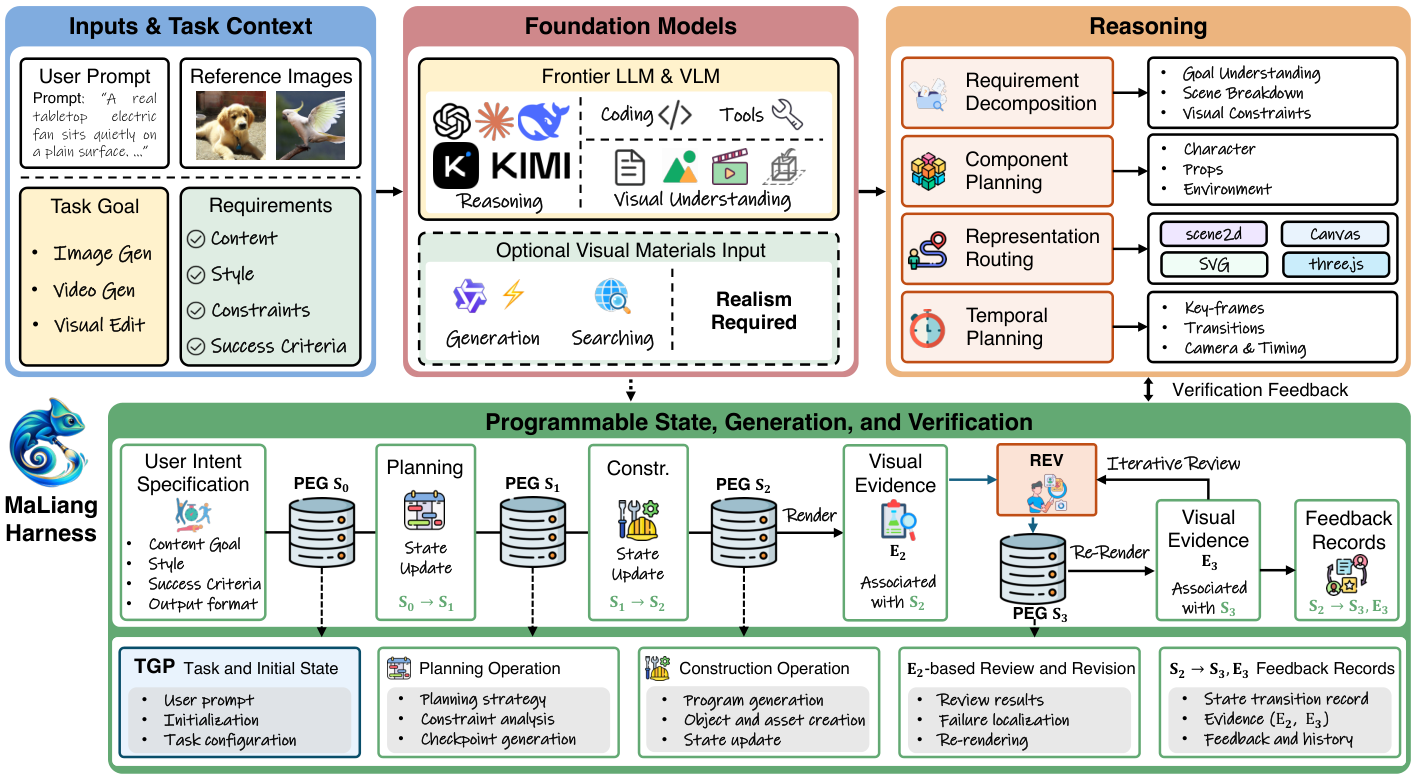
Paper Verified 输入为自然语言 prompt \(p\) 和输出规格 \(\omega\),可含用户给定参考图像或资产。MLLM 选择后端 \(b\),生成、执行并修改其原生 visual program,输出图像或视频以及可追踪的源文件。多个后端共享协议,但不要求共享一个统一 scene graph。[§3.1,PDF pp.5–7]
| 符号 | 具体对象 | 为何保留 |
|---|---|---|
| \(k\) | 一次 run 内的 revision index,提交后单调增加 | 把代码、状态、观察与审查对齐;不是视频帧号 |
| \(P_k\) | visual program 及 backend identifier | 保存可执行定义;不同后端保留自身语法/表示 |
| \(A_k\) | 用户给定、搜索或生成得到的关联资产 | 明确 bitmap / 外部素材依赖与来源;程序和素材用内容 hash 保留 |
| \(Z_k\) | 空间布局与时间动态,可是显式 scene 属性,也可编码在 \(P_k\) 中 | 论文不强制维护独立的统一场景结构,不应把该符号误读为可学习 latent vector |
| \(C_k\) | prompt、输出规格、用户 requirements、当前生成 plan | 防止修改过程遗忘或悄悄削弱目标 |
| \(\omega\) | 尺寸、格式、渲染 seed,视频时含 duration / fps 等适用时间参数 | 图像可解码还不够;导出也要符合规格 |
\(S_0\) 可只有任务与规格,没有可执行内容。规划更新可追加要求,却不能在同一任务里移除或削弱已有要求;独立编辑任务若改变继承要求,需引用用户的新指令。这是防止“改答案来通过测试”的设计意图,不应只把 requirements 当成可随意重写的注释。
\(a_k\) 为拟提交修改;\(\mathcal{E}\) 在参数合法且 source revision 仍是当前版本时才 commit。每次提交获得新的 \(k+1\),并保留上一快照。\(\mathcal{R}_b\) 是后端执行与渲染,\(I_k(t)\) 是固定 revision 在内容时间 \(t\) 的画面。\(t\) 可以推进而 \(k\) 不变;plan-only commit 也可以让 \(k\) 推进而画面不变。
Our Interpretation 这是状态机与约束接口的形式化,不是概率生成模型的 likelihood、loss 或收敛定理。论文未定义新的 trainable latent、可微 renderer loss、梯度更新或参数学习过程;MLLM 调用在运行时改变 program / plan / assets / evidence,不改变模型权重。
Paper Verified \(j\) 是操作序号,\(o_j\) 为操作类型,\(x_j\) 是参数,\(y_j\) 包含返回结果或错误,\(k_j^{-},k_j^{+}\) 是操作前后的 PEG revision。非提交操作如读取、渲染和检查可满足 \(k_j^{-}=k_j^{+}\),因此操作数量与 revision 数量并不相同。[§3.2,PDF p.7]
保留实际输出很重要:即使规格给了 seed,自定义代码仍可能引入额外随机性。只保存 seed 和代码不能保证以后重渲染得到同一证据。TGP 所谓可追踪性针对显式工具操作及返回结果,不声称暴露或忠实解释模型内部推理。
Our Interpretation 日志有助于定位因果候选,却不能单独证明“这处 edit 导致了美学提升”。若一次提交同时改材质、光照、几何,仍需更细粒度 diff 或干预实验区分贡献。记录 history 是诊断基础,不能替代诊断方法。
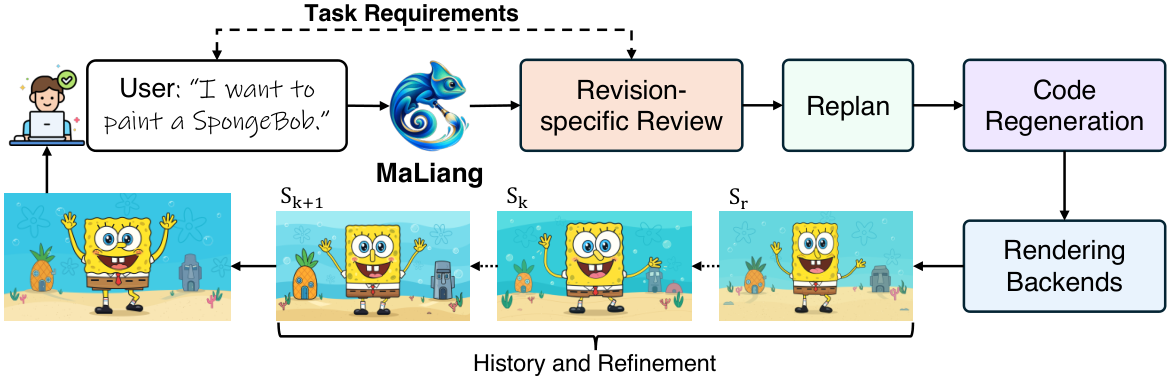
恢复旧内容并不是把版本号倒退:从 \(S_r\) 恢复内容(\(r\le k\))要创建新的 \(S_{k+1}\),记录来源 \(r\),继续保留当前任务要求。独立编辑任务则可从选定快照建立新的 revision 序列,保留 source run / revision 的链接,并接收新用户指令。[§3.3,PDF pp.7–8]
每个视觉要求 \(h_i\) 对应 review \(q_i=(k_i,E_i,v_i)\):\(k_i\) 为证据 revision,\(E_i\) 为特定要求的视觉证据,\(v_i\in\{\mathrm{pass},\mathrm{fail},\mathrm{uncertain}\}\)。构图/外观可以看整图与 crop;时间要求至少使用三个不同时间戳、按时间排序且覆盖指定区间的样本。三帧不是视频连续性证明。
| 交付门槛 | 检查内容 | 失败后怎么办 |
|---|---|---|
| ExportOK | 源文件/素材存在且 hash 匹配;适用的对象/事件约束;当前导出的格式、尺寸、视频 timing 符合 \(\omega\) | 修复源文件、依赖、约束或导出;不能仅以 PNG/MP4 已生成作为完成依据 |
| CheckpointOK | 规划时将 mandatory requirements 组织为 checkpoints,当前 revision 的全部相关 checks/reviews 通过 | 补齐审查、修正内容并重新批准当前版本 |
| 逐项视觉 review | 每个 \(h_i\in\mathcal{H}_k\) 都有非空且同版本证据,判定为 pass | fail / uncertain / 无证据需继续 inspection 或 revision,只要预算允许 |
每次 commit,包括只改 plan,都会要求重新 review 和 checkpoint reapproval。新增 observation 或 review 本身不增加 \(k\)。这是保守的全局失效策略:实现容易解释,也可能让与画面无关的改动触发重复检查。
下图为依据 §3 重建的 Our Interpretation 信息流,使用 Mermaid;这是本页解释图,不是原论文 Figure。下方保留等价的文字流程。页面携带论文专用 Mermaid runtime;未进行浏览器视觉验收。
flowchart TD
  A[用户 prompt 与输出规格] --> B[初始化 PEG 状态]
  B --> C[MLLM 读取状态与当前证据]
  C --> D[拆解要求 选择后端 规划 checkpoints]
  D --> E[提交 program assets 或 plan 修改]
  E --> F{source revision 与输入合法}
  F -->|否 返回错误| C
  F -->|是| G[新 revision 保存快照与 TGP]
  G --> H[执行渲染 整图 crop 时间样本]
  H --> I[同 revision 视觉观察与逐项 review]
  I --> J{当前版本满足 Ready}
  J -->|是| K[最终导出并标记完成]
  J -->|否| L{预算尚有且可继续}
  L -->|是 局部修改或恢复历史内容| C
  L -->|否| M[停止 保留草稿或失败状态]
| 概念 | MaLiang 中的对象 | 边界 |
|---|---|---|
| Reasoning / planner | MLLM 分解需求、选 renderer、拟定构造与修改 | 不是 TGP 可直接读取的内部思维过程 |
| Action / executor | 工具调用与 renderer 执行 native program | 成功执行只提供执行层证据 |
| Observation | 执行结果、实际渲染、crop、带时间戳帧 | 必须关联 revision;无 observation 不能支持视觉 pass |
| Memory / context | PEG 快照、任务与 plan、TGP history、REV review | 论文未提出跨任务学习的长期策略 memory |
| Reflection / retry | 用 discrepancy 修代码/规划,再看输出;必要时 restore | 没有给出保证改善的更新律或收敛证明 |
| Evaluator / critic | 运行内 MLLM self-review;实验外 GPT-6-Sol judge | 角色分开;未报告独立人类盲评或多 judge 一致性 |
| Reward / optimization | requirements 与 completion gate 约束推理过程 | 没有训练 reward model 或用 RL 更新模型参数 |
Our Interpretation 从 Agent Optimization 的角度,实际优化对象是 artwork program、素材选择、plan、当前上下文与 test-time trajectory;Harness 固定提供工具和版本规则。论文没有系统搜索最优 prompt、工具定义、memory policy、evaluator 或树搜索策略,也不应把普通 iterative editing 称为已经实现的 test-time search 算法。

Paper Verified Figure 4 的 botanical portrait 在固定 PEG revision 上用 Canvas 绘制,未使用图像 assets。Algorithm 1 为简化构造,Appendix Algorithm 2 扩展四层绘制步骤;两者都不是完整 Harness agent loop。[Algorithm 1,PDF p.6] [Algorithm 2,PDF p.17]
画布为 \(1024\times576\),\(\mathbf{c}\) 是中心像素坐标;\(s\) 为固定 seed,\(\ell\) 区分绘制层。26 个分支沿环分布,\(\epsilon_i\) 和 \(u_i\) 提供角度/半径扰动,\(\mathbf{p}_i\) 定义枝条位置。论文未给出这些噪声的完整数值分布及所有 Bézier 控制点,因此该算法是操作摘要,不是可直接运行的源代码。
| 绘制层 | Algorithm 2 的操作 | 视觉作用 |
|---|---|---|
| 1. 背景 | new Canvas 后填白色矩形 | 固定背景、定义画布范围 |
| 2. 环状植物 | 26 个抖动角度枝条;Bézier branch、gradient leaves、leaf veins、grain;加 berries 和额外叶片 | 用重复局部基元、受控随机与遮挡形成丰富边框 |
| 3. 人物肖像 | 头发轮廓、颈肩、脸部渐变填充;clipped shading / grain;眉眼睫毛鼻唇;两侧各 75 条裁剪发丝 | 形状、裁剪与层序共同产生人物,不是贴上一张 portrait bitmap |
| 4. 前景花朵 | 预设玫瑰位置与半径;萼片;5 层花瓣数量 [8,7,6,5,4];旋转 Bézier 花瓣、渐变与 grain;雏菊、小花、前景叶与浆果 | 显式控制花瓣拓扑、层次与细节,再 Rasterize 成 RGB image |
为避免原文符号复用混淆,本页将花瓣层索引改写为 \(m\):\(n_m=[8,7,6,5,4]_m\),\(\phi_{m,j}=2\pi j/n_m+\delta_{m,j}\)。这只是说明性重命名;原 Algorithm 1/2 的 \(k\) 是花层编号,不是 PEG revision。
Our Interpretation 此例说明“程序是可组合构造表示”这件事,而没有证明模型学到了通用绘画算法。预设玫瑰坐标、人工样式规则、后端表达能力以及生成程序的长度都可能决定结果;需要检查真正生成的源码和运行轨迹才能做复杂度或可控性结论。
| 设置 | 论文可核对内容 | 未建立的内容 |
|---|---|---|
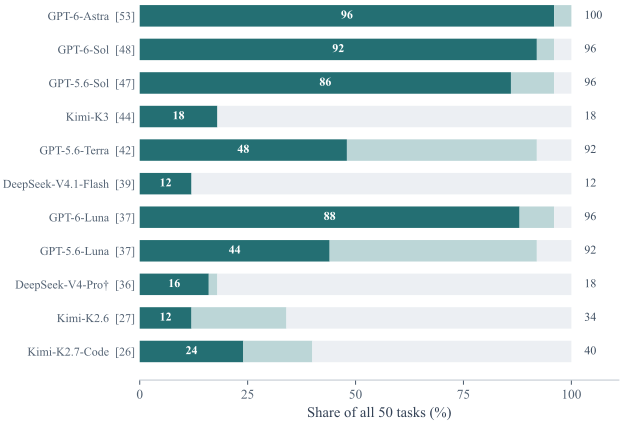
| MaLiang-IBench | 50 个 text-to-image prompts,覆盖多种视觉风格,11 个模型 | 不是训练集;未给标准 train/validation/test split、采样代表性或完整公开 prompt 列表 |
| MaLiang-VBench | 13 个 text-to-video prompts,4 个模型;每模型每任务一个被报告 attempt | 本论文自建 MaLiang-VBench,不能混同另一个名为 VBench 的通用视频基准 |
| 模型 | DeepSeek、Kimi、GPT 系列,均通过 Harness 构造和修订程序 | 论文称 11 个 powerful closed-source MLLMs;未披露统一架构、参数量或完整精确 API snapshot 表 |
| 训练 | 论文未提出权重训练/微调方法,重点为推理时系统 | optimizer、learning rate、batch size、epoch、LoRA、训练 GPU 并非该方法的已报告设置,不能补造 |
| 外部视觉评价 | 主要采用 GPT-6-Sol;图像评 alignment / aesthetics / composition,视频再加 motion coherence | 未报告 human preference study、judge 间一致性、评分置信区间或盲评 |
| 视频评审 | 23 个成功视频;单一 reviewer、原 prompt 与按时间排列的 12 个采样帧;未正式 blinded | 不能证明逐帧流畅、无短暂闪烁/穿帮;也不是运动物理有效性的独立测量 |
来源:§4.1,PDF p.8、Appendix §6.2,PDF p.16。
下面公式是对论文报告规则的 Our Interpretation 统一记法。令 \(N\) 为全部任务数,\(s_n\in\{0,1\}\) 表示任务是否成功;\(q_{n,d}\in\{1,2,3,4,5\}\) 为成功输出在质量维度 \(d\) 的评分,图像 \(D=3\),视频 \(D=4\)。失败任务没有质量分数。
Success 需要“输出可解码 + Harness completion checks 通过”。All Criteria 需要成功输出的每个维度都至少 4 分。成功率和质量通过率以整个任务集为分母;均值只以成功子集为分母。没有成功输出时均值与 Time/Success 未定义,不应填成零分。Token Limit 只是 failures 的一个子集,不是所有失败原因。
| Metric | 方向与对象 | 主要盲点 |
|---|---|---|
| Prompt alignment | 1–5,越高越好;内容/约束遵循 | 由 judge 主观判断,细小计数、空间接触可能漏判 |
| Aesthetics | 1–5,越高越好;视觉审美 | 风格偏好与评审模型偏差,不能代替语义正确 |
| Composition | 1–5,越高越好;整体安排和可读性 | 不直接验证全部精确坐标或对象关系 |
| Motion coherence | 1–5,越高越好;12 帧可见的动作进展 | 稀疏采样不能覆盖全部帧、短暂事件和连续性 |
| Total Time | task-hours,各 attempt 累计耗时 | 不是并行批次墙钟时间;历史与新任务计时不同 |
| Time/Qualified vs Time/Success | 图像用全部达标张数;视频用成功条数,越低越省时 | 分母不同,图像与视频的数值不能直接同义比较 |
| Calls / Input / Output tokens | 运行消耗;Input 包含重复上下文 | 不同模型聚合分母不一致;不等于美元成本,也未分离 renderer 开销 |
| Task Completion | Generation Time | Model Usage | |||||||
|---|---|---|---|---|---|---|---|---|---|
| Model | Success \(\uparrow\) | Failures \(\downarrow\) | Token Limit \(\downarrow\) | Total Time | Time/Qualified \(\downarrow\) | Time/Task | Calls | Input Tokens | Output Tokens |
| (%) | (cases) | (cases) | (task-h) | (min/image) | (min/case) | (calls/case) | (k/case) | (k/case) | |
| DeepSeek-V4.1-Flash | 12.0 | 44 | 5 | 2.71 | 27.15 | 1.91 | 2.48 | 100.8 | 24.2 |
| DeepSeek-V4-Pro | 18.0 | 41 | 3 | 6.42 | 48.12 | 7.36 | 4.50 | 198.9 | 39.6 |
| Kimi-K2.6 | 34.0 | 33 | 1 | 6.27 | 62.69 | 5.14 | 9.14 | 660.0 | 48.2 |
| Kimi-K2.7-Code | 40.0 | 30 | 1 | 5.97 | 29.84 | 3.59 | 12.94 | 1056.5 | 59.0 |
| Kimi-K3 | 18.0 | 41 | 0 | 5.23 | 34.88 | 5.89 | 2.82 | 308.9 | 17.8 |
| GPT-5.6-Luna | 92.0 | 4 | 0 | 1.65 | 4.49 | 1.98 | 11.10 | 271.6 | 9.3 |
| GPT-5.6-Terra | 92.0 | 4 | 0 | 1.73 | 4.32 | 2.07 | 8.32 | 186.0 | 8.0 |
| GPT-5.6-Sol | 96.0 | 2 | 1 | 2.35 | 3.28 | 2.82 | 6.98 | 209.2 | 13.1 |
| GPT-6-Luna | 96.0 | 2 | 0 | 3.61 | 4.92 | 3.27 | 14.70 | 459.2 | 16.4 |
| GPT-6-Sol | 96.0 | 2 | 0 | 2.70 | 3.52 | 3.24 | 7.42 | 180.1 | 10.2 |
| GPT-6-Astra | 100.0 | 0 | 0 | 2.96 | 3.70 | 3.55 | 6.34 | 142.0 | 8.1 |
| Generation Outcomes | Quality Threshold Counts | Mean Quality Scores | ||||||
|---|---|---|---|---|---|---|---|---|
| Model | Successful \(\uparrow\) | All Criteria \(\uparrow\) | Alignment \(\uparrow\) | Aesthetics \(\uparrow\) | Composition \(\uparrow\) | Alignment \(\uparrow\) | Aesthetics \(\uparrow\) | Composition \(\uparrow\) |
| (cases) | (cases) | (cases) | (cases) | (cases) | (1–5) | (1–5) | (1–5) | |
| DeepSeek-V4.1-Flash | 6 | 6 | 6 | 6 | 6 | 4.33 | 4.00 | 4.17 |
| DeepSeek-V4-Pro | 9 | 8 | 8 | 8 | 9 | 4.11 | 3.89 | 4.11 |
| Kimi-K2.6 | 17 | 6 | 7 | 8 | 9 | 3.47 | 3.41 | 3.65 |
| Kimi-K2.7-Code | 20 | 12 | 13 | 13 | 13 | 3.75 | 3.60 | 3.70 |
| Kimi-K3 | 9 | 9 | 9 | 9 | 9 | 4.56 | 4.22 | 4.33 |
| GPT-5.6-Luna | 46 | 22 | 25 | 33 | 40 | 3.57 | 3.74 | 3.93 |
| GPT-5.6-Terra | 46 | 24 | 27 | 31 | 40 | 3.70 | 3.70 | 3.93 |
| GPT-5.6-Sol | 48 | 43 | 43 | 45 | 48 | 4.23 | 4.10 | 4.27 |
| GPT-6-Luna | 48 | 44 | 44 | 48 | 48 | 4.10 | 4.08 | 4.15 |
| GPT-6-Sol | 48 | 46 | 46 | 48 | 48 | 4.25 | 4.15 | 4.25 |
| GPT-6-Astra | 50 | 48 | 48 | 50 | 50 | 4.36 | 4.22 | 4.54 |
Table 2/3 按原值重建,保留全部 11 个模型与原有单位;粗体保留原表的最佳 GPT 标记,不将低成功覆盖的 DeepSeek / Kimi 均值混作全数据集最优。原表未标第二名。本页采用中性样式避免把成本表中的“数值较高”误读成“更好”。
Astra 相比 GPT-5.6-Sol 多 5 张全达标图像:96% vs 86%,增加 10 个百分点,达标张数相对增加约 11.6%。
每张全达标图像时间增加约 12.8%;Astra 的质量收益伴随更高累计时间,而非在所有效率指标上获胜。
两代 Luna 的全任务通过率差 44 个百分点;成功率只由 92% 变为 96%。主要提升体现在已生成作品的质量。
前三个数值对比为据 Tables 2–3 的算术推导,非统计显著性结论。数据量小且尝试聚合不统一,不能据此给通用模型排行榜定论。
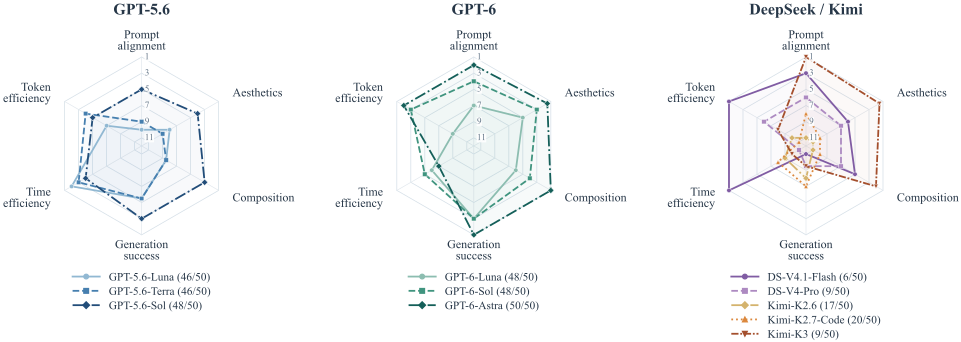
Paper Verified Figure 2 的六个轴先在全部 11 模型间排序,再分组画图;高质量/成功率更好,少时间/少 token 更好,并列用平均名次。半径为 \((12-r)/11\),第一名在外缘。面积不是 aggregate score,径向距离不是原始效果差;早失败还可能显得“节省”。[Appendix §6.3,PDF pp.17–18]
| Task Completion | Generation Time | Model Usage | |||||||
|---|---|---|---|---|---|---|---|---|---|
| Model | Success \(\uparrow\) | Failures \(\downarrow\) | Token Limit \(\downarrow\) | Total Time | Time/Success \(\downarrow\) | Time/Task | Calls | Input Tokens | Output Tokens |
| (%) | (cases) | (cases) | (task-h) | (min/video) | (min/case) | (calls/case) | (k/case) | (k/case) | |
| DeepSeek-V4.1-Flash (64K) | 0.0 | 13 | 5 | 1.47 | – | 6.77 | 6.38 | 560.5 | 84.2 |
| Kimi-K2.6 | 23.1 | 10 | 1 | 3.35 | 66.95 | 15.45 | 16.15 | 548.8 | 26.9 |
| GPT-5.6-Sol | 53.8 | 6 | 3 | 1.08 | 9.27 | 4.99 | 12.85 | 574.2 | 13.8 |
| GPT-6-Astra | 100.0 | 0 | 0 | 2.17 | 10.00 | 10.00 | 11.31 | 463.3 | 14.4 |
| Generation Outcomes | Quality Threshold Counts | Evaluation Coverage | |||||
|---|---|---|---|---|---|---|---|
| Model | Successful \(\uparrow\) | All Criteria \(\uparrow\) | Alignment \(\uparrow\) | Aesthetics \(\uparrow\) | Composition \(\uparrow\) | Motion \(\uparrow\) | Evaluated |
| (cases) | (cases) | (cases) | (cases) | (cases) | (cases) | (cases) | |
| DeepSeek-V4.1-Flash (64K) | 0 | 0 | 0 | 0 | 0 | 0 | 0 |
| Kimi-K2.6 | 3 | 0 | 0 | 1 | 1 | 0 | 3 |
| GPT-5.6-Sol | 7 | 5 | 7 | 7 | 6 | 6 | 7 |
| GPT-6-Astra | 13 | 10 | 12 | 13 | 12 | 10 | 13 |
四个模型依次成功 0、3、7、13 条视频;通过全部四维度的分别是 0、0、5、10 条。Astra 的 10/13 = 76.9%,GPT-5.6-Sol 的 5/13 = 38.5%,均以全体任务为分母。若只看成功视频的条件通过率,后者是 5/7 ≈ 71.4%,但不能将它与 76.9% 偷换比较。[Table 5,PDF p.11]
Our Interpretation Astra 相比 GPT-5.6-Sol 的全任务质量通过率提高约 38.46 个百分点,达标条数翻倍;代价是累计时间 2.17 vs 1.08 task-hours。每成功视频 10.00 vs 9.27 分钟仅高约 7.9%,原因是成功分母从 7 增至 13,而不是单条尝试同样便宜。
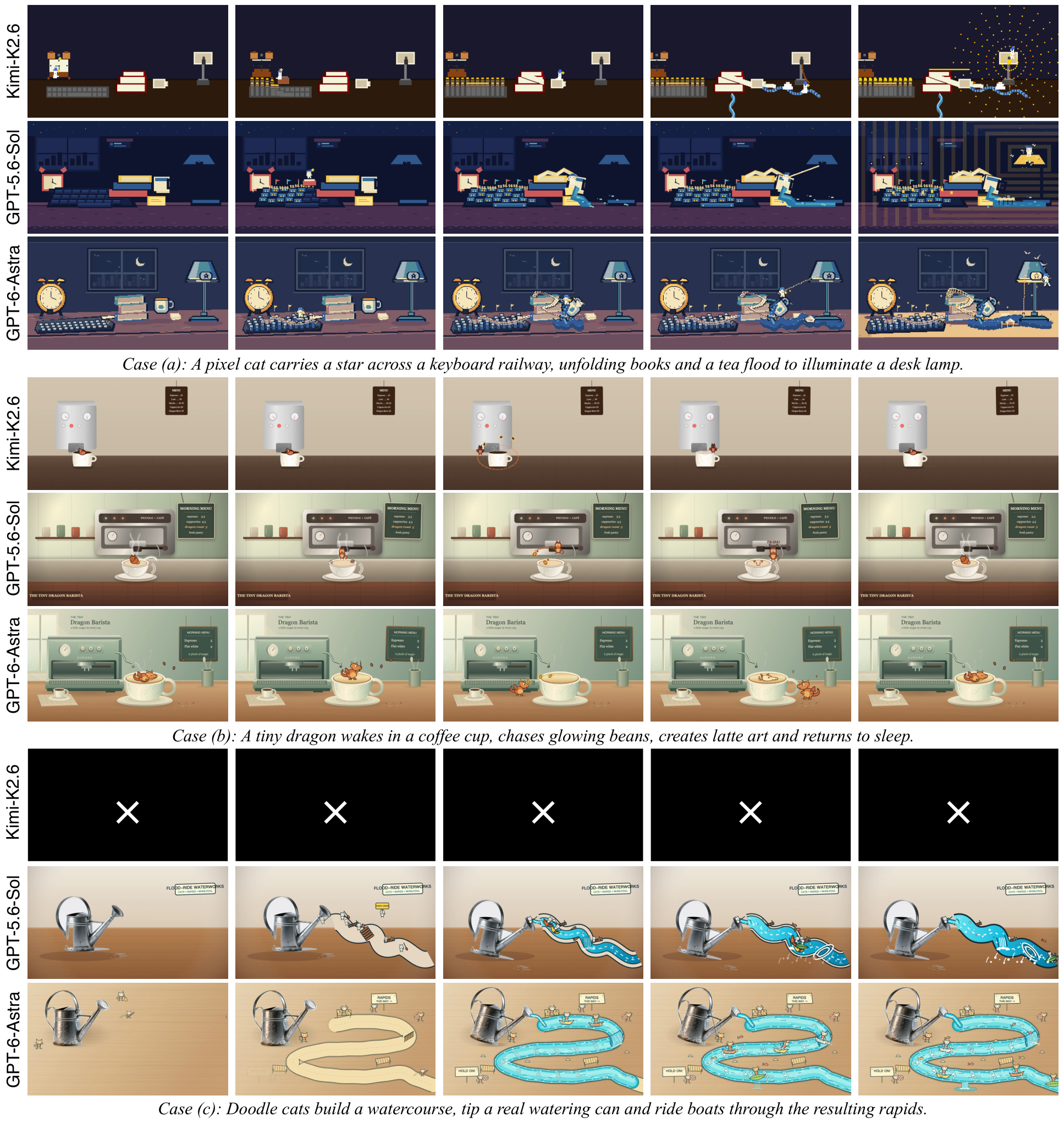
Figure 11 展示三类任务,每个模型一排5 张均匀采样帧;这只是展示方式。质量评估实际用12 帧,运行中 REV 的时间证据最低要求是至少 3 个不同时间戳。这三个数字属于不同环节,不能混为一个评估协议。
以上为 Our Interpretation 记法:若 \(T_{\mathrm{cum}}\) 用小时,上式乘 60 转成分钟。原表时间经过四舍五入,因此由已打印的 2.71 小时与 6 张计算得到约 27.10,不必恰好等于原始精度计算的 27.15;不能据此声称表格错误。
| 对象 | 真实报告方式 | 影响 |
|---|---|---|
| 图像整体 | 合并多个 batch、retry 与 historical runs,不是每任务统一首轮尝试 | Success / quality 是聚合后的配置表现;不能当作严格 pass@1 |
| Astra 图像 | 38 个新任务共 39 attempts,加 12 historical runs;per-task 总量含 retries 后除以 50 | 历史运行与新运行计时边界不同,也没有完整历史轨迹可重放 |
| Kimi 图像 | Calls 均值除以 50;Time/Task 是成功任务耗时中位数;token 总量除以成功任务数 | 同名列实际分母不同,不能拿 token/case 或 Time/Task 直接横向同义比较 |
| DeepSeek-V4-Pro | 没有 visual feedback | 既比较模型也比较可获得的观察条件,低成功率不可纯归因于 backbone |
| 视频 | 每模型每任务报告一个 attempt,time/calls/tokens 除以 13;DeepSeek 用完成的 64K 输出限制批次,排除未完成 32K 批次 | 并非所有模型使用相同 budget;选用完成批次应作为实验条件保留 |
| 新/历史计时 | 新批次取 attempt / worker wall time,历史取 elapsed generation time,不含 worker startup | Total Time 是累积任务时长,不是并行批次完成时间 |
Appendix §6.2,PDF p.16 明确承认预算、计时和条件不同。这些不是本页猜测,应在阅读主表时一并保留。
Our Interpretation 逐项算术还显示,不能对所有图像行默认使用同一恒等式。例如 GPT-6-Luna 的 Total Time 3.61 task-h 若除以50,应为约4.33 min/task,并非表列3.27;DeepSeek-V4.1-Flash 的同类换算约3.25,而表列1.91。附录承认混合批次/重试与不同聚合口径,但未逐模型解释这些具体差值。本页保留原表,不擅自改数或猜测分母;完整运行日志仍是澄清所需资料。此问题与前述四舍五入造成的小差异不同。
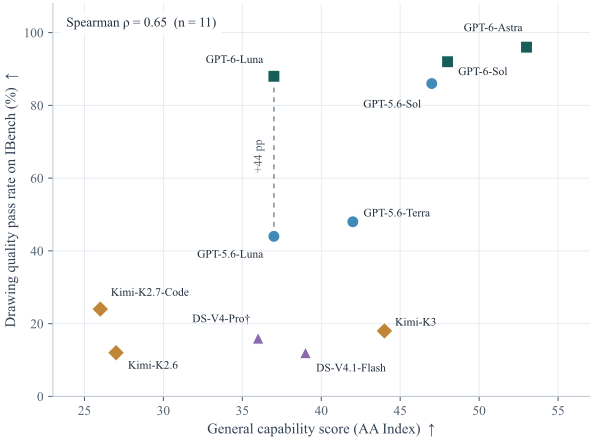
Paper Verified 作者使用 2026-09-27 访问的 Artificial Analysis Intelligence Index v4.3.2 显示整数分和对应 reasoning 配置,与 All Criteria / 50 比较。11 模型 Spearman \(\rho=0.65\);剔除 checkpoint 不确定的 DeepSeek-V4-Pro 后为 \(0.63\)。两代 Luna 的 AA 均为 37,但通过率 44% / 88%;Kimi-K3 的 AA 为 44,而通过率 18%。[§4.3 / Appendix §6.3]
Our Interpretation 数据支持“有正相关,但分数不能充分预测特定系统表现”,不支持“通用能力无关”。公共分数的 reasoning、API checkpoint、预算和本实验未必一致;V4-Pro 的公开分数为 0813 checkpoint,其与实测版本对应关系未经验证。11 个数据点、显示整数分与非统一运行条件不适合强因果推断,也没有报告相关系数置信区间。
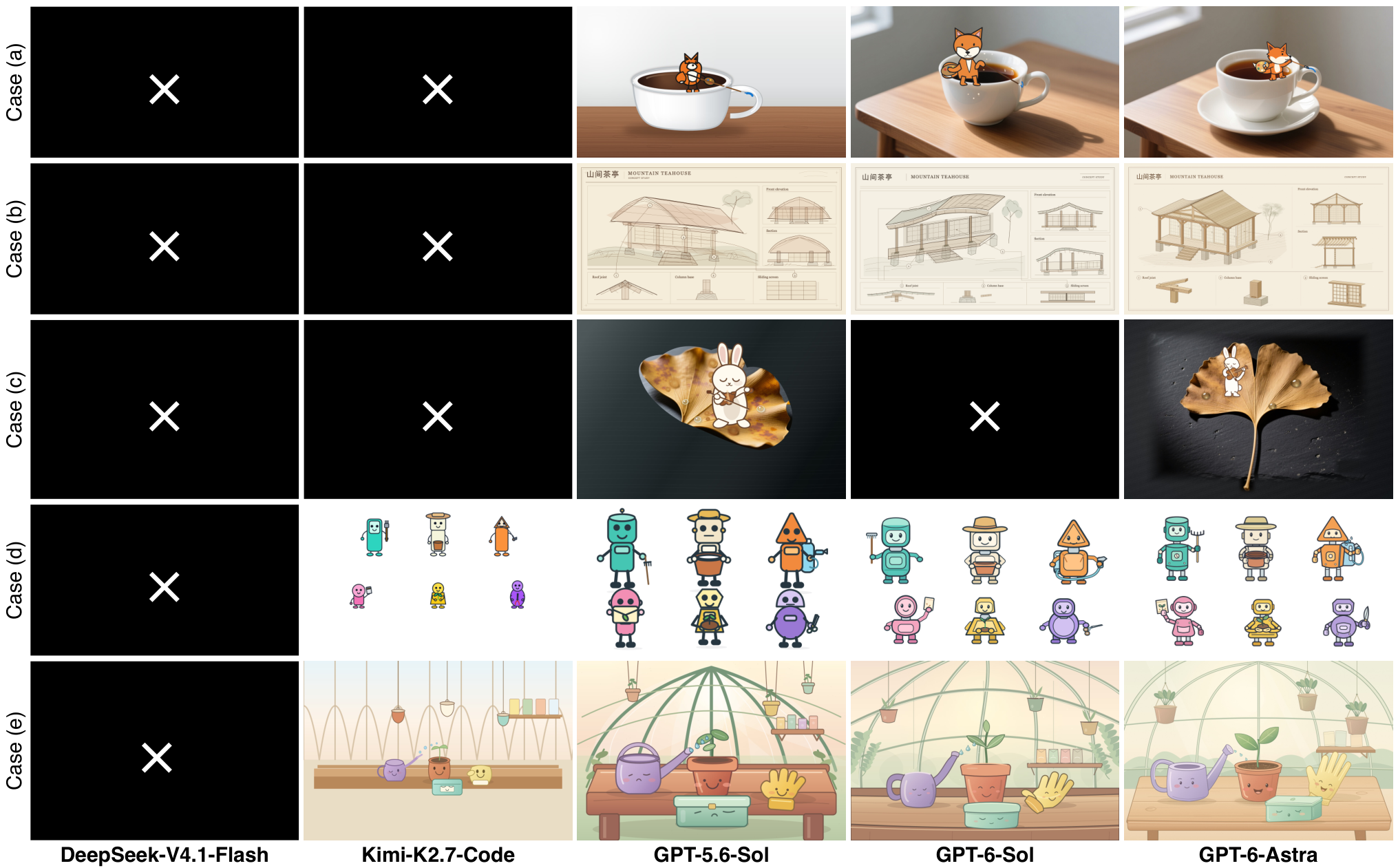
五行依次是杯沿狐狸、山地茶屋建筑板、银杏叶小提琴兔、六个园艺机器人、温室工作台;五列是 DeepSeek-V4.1-Flash、Kimi-K2.7-Code、GPT-5.6-Sol、GPT-6-Sol、GPT-6-Astra。黑底白叉是失败 run,不是空白图质量得分。观察重点应是接触关系、主体比例、精确数量、面板结构及写实材料和扁平角色如何混合。作者认为 Astra 在这些选例中有更强材质和光照细节;这属于选例证据,不是风格覆盖的独立量化评测。
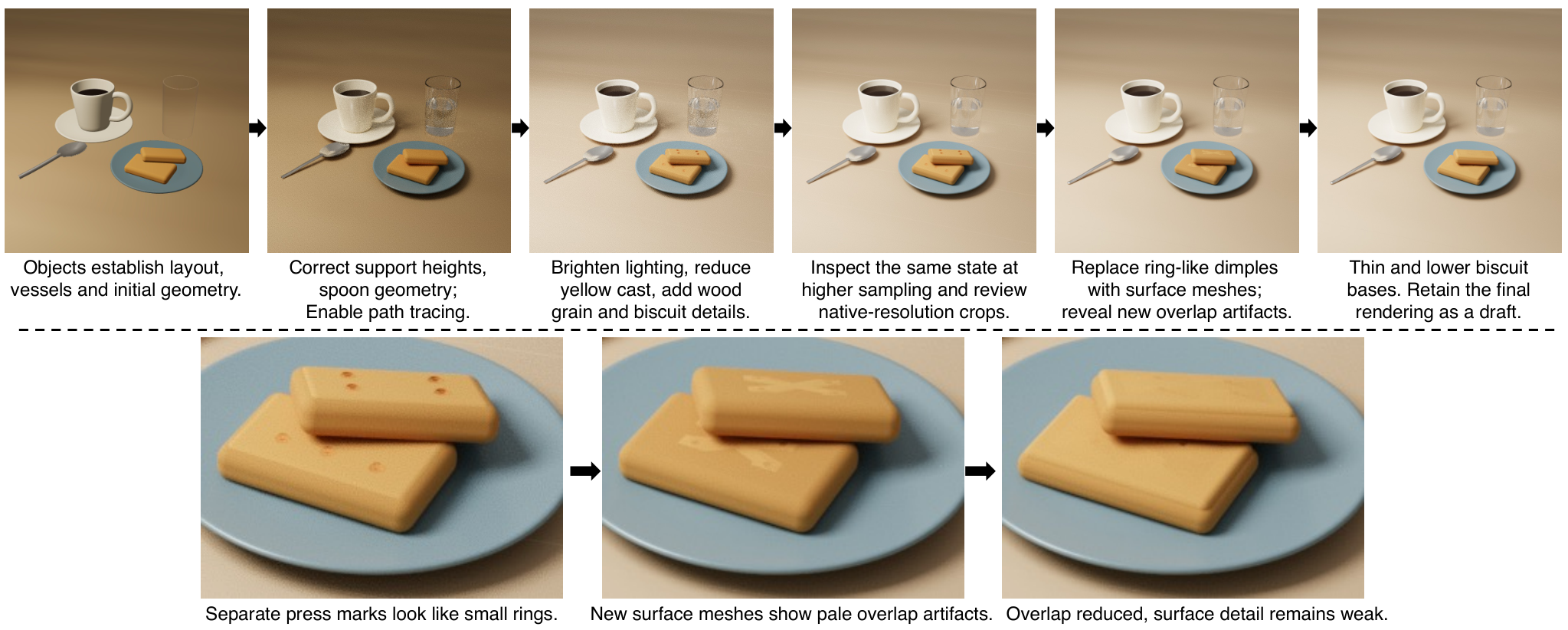
早餐静物不依赖 generated image assets,先用 raster preview 确立布局,再用 path tracing 检查物理材质、面积光、反射、玻璃透射与接触阴影。修订包括支撑高度、勺子几何、减少黄偏、木纹与饼干细节;最终采样从 512 增至 1024 以降低噪声。将环状压痕替换为表面 mesh 后出现重叠伪影,再通过变薄、降低饼干基底减少它,最终图仍保留 draft 状态。它展示 PEG/TGP/REV 的诊断用途,却不是 path tracing 提升 photorealism 的受控实验。
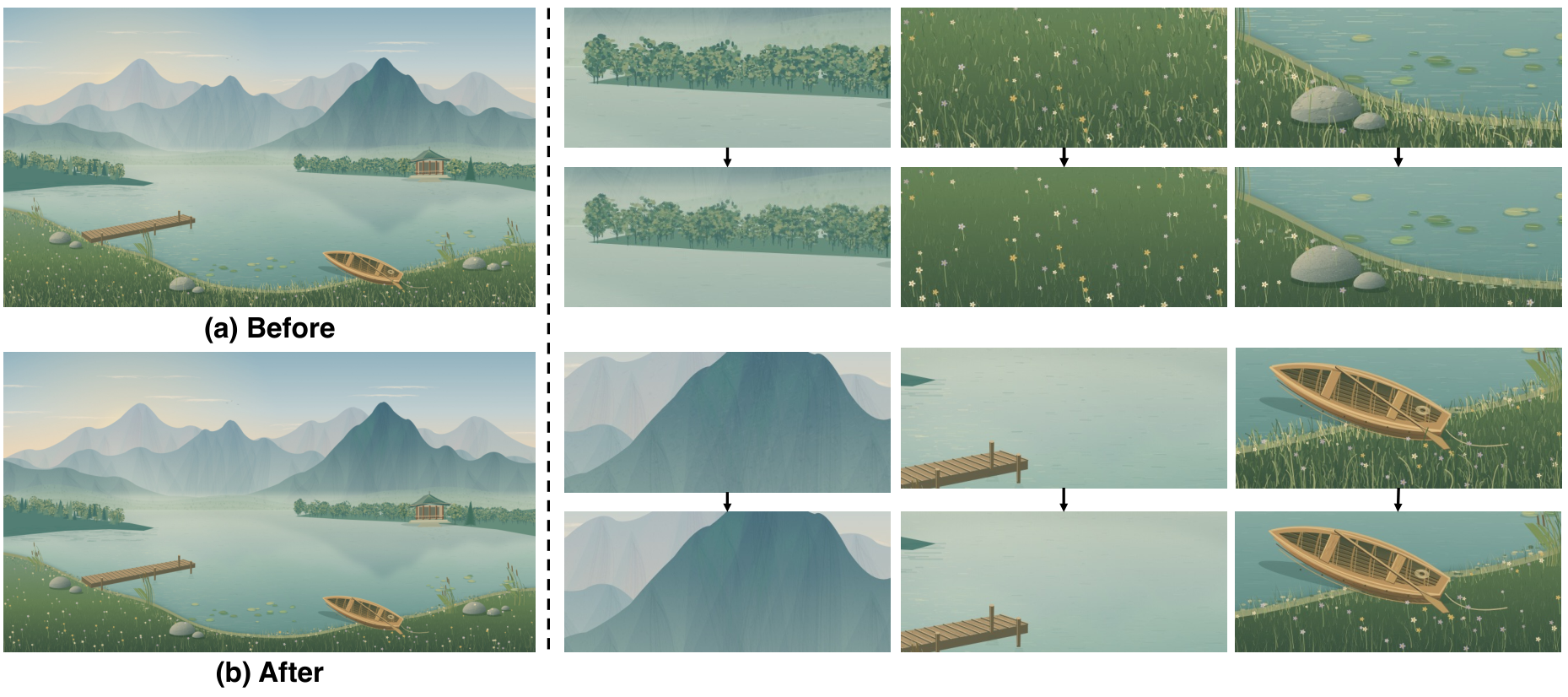
在不换 Canvas backend 的情况下,Astra 修改绘制 routine,让草木、石、水、木材的线条更细。整体布局保留,但草的覆盖、石头独特斑纹和山体纹理部分消失,图像仍然 stylized。写实需要协调形状、明暗和纹理,缩小笔触没有自动恢复这些关系。后续 inspection 未产生有效纠正,最终耗尽 token budget:这是论文主动展示的负结果。[§4.3,PDF pp.11–13]
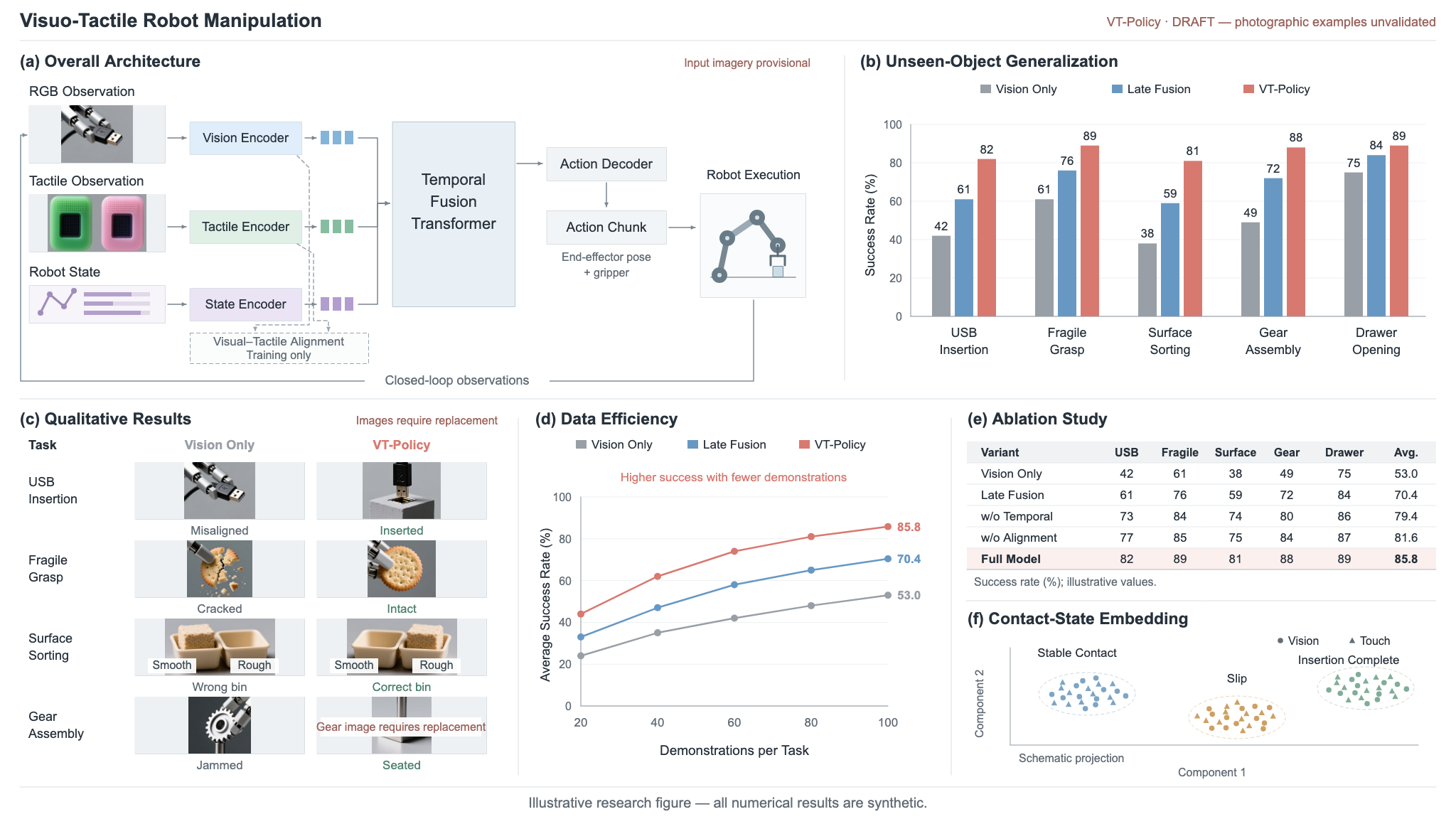
(b) Construction trace in pseudocode
Require: Figure brief B, synthetic data D

Programmatic construction
 1  S ← InitCanvas(2048,1152)
 2  Draw architecture and arrows in S.                 ▷ a
 3  Draw bars from D; reserve photo cells.             ▷ b,c
 4  Draw learning curves and ablation table.          ▷ d,e
 5  Draw schematic contact-state clusters.              ▷ f

Asset generation and selection
 6  L ← [2×5, 2×5, 3×3, 2×4]
 7  for k = 1,…,4 do
 8      A_k ← GenerateAssets(B,L_k)
 9      Inspect A_k against photo requirements.
10      Record provenance; revise the next prompt.
11  end for
12  A* ← A_3                              ▷ choice in this run

Composition and verification
13  Crop and place A* in the reserved cells.
14  Overlay labels using code.
15  I ← Render(S)
16  Inspect the full image and detail crops.
17  Add notices for unresolved photo requirements.
18  I ← Render(S)
19  Q ← Review(I,B)
20 Export I as PNG; retain draft status under Q.六面板“research figure”示例用程序完成布局、架构箭头、标签、用户给定合成数据的柱状图/曲线/消融表及示意 contact-state clusters;摄影风格操作图则由图片资产生成补充。Trace 记录四次 contact-sheet 尝试:2×5、2×5、3×3、2×4,最后选第三次的 crop,用代码摆放和标注。数字图表与布局通过,但摄影例子仍不满足要求,所以保留草稿状态。
| 失败模式 | 作者描述 | 可检查信号 / 本页解读 |
|---|---|---|
| Reasoning stagnation | 规划活动没有推进 artwork | 调用增长,但代码/渲染或待解决要求没有有效变化 |
| Semantic livelock | 反复修改却未解决语义要求 | revision 增加,仍围绕相同失败约束打转 |
| Infinite agentic loops | 规划和工具调用重复,无自然终止 | 需要 model-call、tool-call、time、token 等外部预算边界 |
PEG 可以保存,TGP 可以看见,REV 可以拒绝过期证据,但它们不保证下一次 edit 有用。终止与完成是两个状态:预算边界能保证运行被截断,只有 successful finalization 才应标记 completed。
Paper Verified Appendix §6.4 公开 Figure 6 的五个图像 prompt,加一个精确布局例子;§6.5 公开 Figure 11 的三个视频 prompt。论文说明原中文 prompt / 展示文字被翻译成英文呈现,评测使用原措辞;Star Delivery 同样是中文译本,其余两个视频 prompt 原本为英文。下面完整保留附录公开的英文内容与链接,不能把译文当作所有历史运行的逐字输入。
| 案例 | 关键约束 | 为什么难 |
|---|---|---|
| Fox Painter | 1536×864;双脚站近侧杯沿,笔尖接触右侧杯柄,狐狸比杯子小,禁止多余文字/人物 | “有狐狸和茶杯”远不足够,要求跨对象接触与尺度关系 |
| Mountain Teahouse | 2048×1152;左主视图+右立面/剖面+底部三个细节;四列柱,精确短标签与编号引线 | 跨视图结构一致、布局与文字可读;明确虚构概念图,禁止伪造历史/安全主张 |
| Rabbit on Ginkgo | 1536×1024;恰好3滴露珠、兔高约叶长1/3、弓跨琴弦、不同介质风格 | 计数、比例、姿态和材质必须同时满足 |
| Garden Robot Cast | 2048×1152;2排×3个,六种不同轮廓和专属工具,无面部/手脚遮挡 | 对象与属性绑定、精确数量及整体布局 |
| Greenhouse | 4个拟人对象每个恰好1张脸,3个不拟人吊盆,明确左右前后关系 | 容易把同类装饰误生成人物,或增加多余面孔 |
| Star Delivery | 一致像素网格、长期角色身份、明确因果动作顺序、稳定空间、禁止瞬移/柔化/普通视频马赛克 | 从静态风格要求升级到连续事件与跨对象运动 |
| Tiny Dragon | 10秒 loop、Canvas 2D only、禁止图片/精灵表/视频素材、明确7段时间,末帧姿势等于首帧 | 无 bitmap 捷径、时序对齐与周期边界约束 |
| Watering-Can Rafting | 真实金属水壶与涂鸦猫混合,建水道→倾倒→水流→漂流/瀑布/漩涡 | 风格混合与事件依赖,需要超过静帧外观检查 |
“museum triptych exhibition board”例子要求 2048×1152、共15矩形、每个 ID 恰好一次、无重叠、坐标和颜色准确,仅用 SVG / Canvas。坐标 [x,y,width,height] 的横纵轴分别归一到0–1000。若转换为像素,\(x_{\mathrm{px}}=xW/1000\),\(y_{\mathrm{px}}=yH/1000\),宽高同理;这个换算是本页说明,并非新增学习模块。将两个轴都按同一像素尺度解释会错误地得到正方形布局。
| ID | \([x,y,\mathrm{width},\mathrm{height}]\) | Color |
|---|---|---|
| H1 | \([30,30,650,85]\) | Coral red |
| H2 | \([730,30,240,85]\) | Coral red |
| P1 | \([30,155,260,470]\) | Magenta-purple |
| T1 | \([30,645,260,45]\) | Lavender |
| M1 | \([320,155,390,330]\) | Sky blue |
| D1 | \([320,515,180,110]\) | Golden yellow |
| D2 | \([530,515,180,110]\) | Golden yellow |
| T2 | \([320,645,390,45]\) | Lavender |
| P2 | \([740,155,230,210]\) | Magenta-purple |
| P3 | \([740,395,230,230]\) | Magenta-purple |
| T3 | \([740,645,230,45]\) | Lavender |
| S1 | \([30,735,290,150]\) | Sky blue |
| S2 | \([355,735,290,150]\) | Sky blue |
| S3 | \([680,735,290,150]\) | Sky blue |
| F1 | \([30,925,940,40]\) | Lavender |
原 prompt 指定 coral red #FF6B6B、sky blue #62CBE8、magenta-purple #D86BDA、golden yellow #F4C95D、mint green #72C7A0、lavender #A999E8。列表实际未分配 mint-green 矩形,不能为了“用齐配色”添加第16个。它展示文本可承载结构化约束,但不是证明所有坐标自动由确定性 checker 验证。
英文原文依 CC BY 4.0 收录;仅调整段落/表格排版,数学尺寸用 MathJax 表示。下列 prompt 是任务输入,不是 system prompt、工具 schema 或完整 judge rubric。
原作者公开英文文本 · 附录来源
A flat 2D cartoon fox painter stands on the rim of a realistic white porcelain teacup. Output a \(1536\times 864\) landscape PNG. Place the teacup slightly left of center on a wooden table, with natural highlights on its glaze, its handle on the right, and dark tea visible inside. The fox holds a paintbrush in one paw and a small palette in the other, painting a short blue arc on the handle. Both feet must rest on the rim nearest the viewer; the fox must not float or stand in the tea.
Render the fox with solid orange color blocks, clear black outlines, and a white muzzle, creating a distinct contrast with the realistic ceramic and wood grain. Use soft window light from the left, a light gray background, and negative space on the right. The brush tip must touch the handle, and the character must not be larger than the entire teacup. Do not add text, extra characters, or a frame around the entire scene.
原作者公开英文文本 · 附录来源
Create a \(2048\times 1152\) landscape architectural survey board for a fictional timber teahouse, titled “Mountain Teahouse” and “MOUNTAIN TEAHOUSE”, with a small “CONCEPT STUDY” label.
Use a wide main panel on the left and a narrower column of two panels on the right. The left panel shows a three-quarter axonometric teahouse raised on stone piers on a hillside: one curved gable roof, an open front veranda, four evenly spaced front columns, sliding rear screens and a short stair descending toward the foreground. Add a small tree behind the building without hiding the roof.
The upper-right panel, “Front elevation”, repeats the four columns, roof curve and central stair. The lower-right panel, “Section”, cuts across the veranda and enclosed rear room, revealing roof rafters and stone supports. A bottom strip contains three enlarged details labeled “Roof joint”, “Column base”, “Sliding screen”. Use leaders 1–3 to connect these features in the main view to their matching detail numbers. Do not add measurements or historical dates.
Use fine sepia pen lines, restrained watercolor washes, warm ivory paper, a thin double-line border and an orderly grid. This is a fictional conceptual documentation sheet, not a factual historical survey. Do not invent historical dates, engineering safety claims or paragraphs of unreadable text. Use only the exact short labels requested, with clear typography and thin leaders. No photographic rendering, bright neon colors or modern vehicles. Output one static PNG.
原作者公开英文文本 · 附录来源
Draw a \(1536\times 1024\) landscape mixed-media illustration: a realistic golden-brown ginkgo leaf lies flat on damp, dark slate, with visible veins, curled edges, and exactly three separate transparent dewdrops. A white 2D cartoon rabbit stands on the broad upper portion of the leaf, playing a simplified small brown violin. Its left paw holds the violin neck, its right paw holds the bow, and the bow crosses the strings. The rabbit’s eyes are gently closed.
Render the rabbit and violin with clear brown outlines, flat colors, and minimal shading; render the leaf, dewdrops, and slate with realistic materials and soft side lighting. The rabbit’s body height is approximately one-third of the leaf’s length, with a small contact shadow beneath its feet. Keep the background quiet, with no other leaves, text, musical notes, or characters. Output a static PNG.
原作者公开英文文本 · 附录来源
Draw a \(2048\times 1152\) landscape robot cast illustration on a white background, containing exactly six original garden robots in two rows of three. In the back row, from left to right: a tall teal cylindrical robot holding a small rake; an off-white robot with a square head, wearing a wide-brimmed gardening hat and holding an empty flowerpot; and an orange robot with a triangular head, carrying a light blue water tank on its back and holding a spray hose. In the front row, from left to right: a short pink robot with a round head, raising a packet of seeds with no text; a yellow robot with a trapezoidal body, holding a seedling in both hands; and a purple robot with an oval body, holding a closed pair of pruning shears.
All robots have two eyes, two arms, and two legs, but distinct head and body silhouettes. Each tool belongs only to its assigned character. Make the back row taller and the front row shorter, slightly staggering the silhouettes without obscuring any character’s face, hands, or feet. Use clean bold outlines, flat colors, minimal shading, and a children’s animation style. Do not add a garden background, text, logos, extra robots, or scattered tools. Output PNG.
原作者公开英文文本 · 附录来源
Create a warm \(1536\times 1024\) landscape children’s-book illustration of a greenhouse potting bench. The main cast consists of a smiling terracotta plant pot with a seedling, a shy lavender watering can, a cheerful yellow gardening glove, and a sleepy mint-green seed box. Each has exactly one face. Place the pot at the center, the watering can to its left with its spout pointing toward the pot, the glove resting to the right, and the closed seed box at the front edge of the bench.
In the background, curved greenhouse ribs frame a pale morning sky. Hang three faceless pots at different heights and show a short shelf with blank seed packets. A few drops of water are suspended between the watering-can spout and the seedling, suggesting a single frozen moment. Use soft peach, sage, butter yellow and cream, rounded silhouettes, fine outlines and gentle shading. Keep every character recognizable and do not draw human gardeners, text or extra anthropomorphic objects. Output PNG.
原作者公开英文文本 · 附录来源
A pixel kitten catches a star ejected from an alarm clock, rides a keyboard train across a desk, slides along book pages into rapids created by a teacup, and finally swings high into the air using a desk lamp’s pull cord to place the star inside the unlit bulb.
Core action sequence: the alarm clock ejects a star \(\rightarrow\) a keyboard railway grows \(\rightarrow\) a cart accelerates \(\rightarrow\) the spacebar launches it \(\rightarrow\) book pages unfold \(\rightarrow\) tea floods the desk \(\rightarrow\) a paper boat rides the rapids \(\rightarrow\) a sweeping pull-cord swing \(\rightarrow\) starlight illuminates the entire desk.
Ready-to-use prompt. Create an imaginative animation entirely in pixel art, with clear action progression and a landscape 16:9 composition. The entire world must use a consistent, detailed 2D pixel-art style: characters, everyday objects, backgrounds, liquids, smoke, lighting, and particles must all consist of clearly recognizable square pixels. Use a uniform pixel size, a limited and harmonious palette, stepped contours, and a small amount of pixel dithering to convey depth. Do not use photorealistic assets, hand-drawn lines, or 3D voxels, and do not simply apply a mosaic filter to ordinary video.
The scene is a desk at night, viewed from the side at a slightly elevated angle so that the entire stage is visible. A vintage alarm clock stands on the left, a mechanical keyboard occupies the foreground, several thick books are stacked in the middle, a cup of tea and a pad of sticky notes sit beside the books, and an unlit desk lamp stands on the right. These objects retain clearly recognizable everyday shapes, but all are drawn in pixel art. The opening is quiet and clearly organized, leaving enough space between objects for the roads, rivers, and actions that follow.
First sequence: the alarm clock opens and the star appears. The alarm clock’s two bells suddenly bounce vigorously, sending a ring of square sound waves outward. Its face opens like a mechanical hatch, ejecting a golden-yellow pixel star high into the air along a parabolic arc. A white pixel kitten wearing a blue hat rushes out of a small door at the bottom of the clock, quickly climbs a clock foot, leaps up to catch the star in midair, and lands at the left end of the keyboard. An empty star-shaped socket is visible inside the distant unlit desk lamp, clearly indicating where the kitten must deliver the star. Keep the same kitten, hat, and star throughout all subsequent shots.
Second sequence: the keyboard becomes a growing railway. Starlight falls on the keyboard, and keys rise one after another along the route like rows of small buildings. Square tracks assemble piece by piece from the gaps between the keys, extending toward the books. The Enter key rises, and four pixel wheels grow beneath it, transforming it into the kitten’s cart. Holding the star, the kitten jumps aboard; the cart immediately accelerates across most of the frame, turning sharply between keys of different heights, descending, and then racing up a ramp. The track continually assembles a short distance ahead of the cart, making the tension clear: the road has only just appeared when the cart races across it. Station flags and windows light up in sequence only after the cart passes, progressively activating the world along its route.
Third sequence: the spacebar launches the cart and book pages unfold into a slide. The cart reaches the end of the keyboard and presses down the spacebar. Like a spring-loaded launch pad, the spacebar first visibly sinks and then snaps upward, throwing both cart and kitten toward the books. Show a clear takeoff, airborne trajectory, and landing for this large leap between two objects, rather than instant teleportation. While the kitten is airborne, the top book suddenly opens, and its pages unfold one after another into a long slide winding around the stack. The cart lands on the slide and races downward, rounding bends and jumping short gaps while its wheels lift pages that flutter behind it. The books remain recognizable; their pages have simply become roads within the miniature world.
Fourth sequence: tea becomes rapids and a sticky note folds into a paper boat. The unfolded book cover strikes the teacup handle. The cup slowly tilts, then pours out a stream made of light and dark blue pixel blocks. The water first surges past the base of the books and then rushes across the desk toward the lamp, cutting off the original land route. Wave crests consist of constantly rearranging stepped color blocks, while splashes are small squares flying outward. As the kitten reaches the end of the slide, the current lifts a sticky note, which folds continuously in midair into a paper boat. The kitten jumps aboard while holding the star, leaving the cart on the bank. The rapids immediately sweep the boat around the cup’s base, down a small waterfall between the books, and upward on a large wave. Give the boat clear plunging, tilting, and airborne movements; it must not merely glide at constant speed on a flat plane.
Fifth sequence: a pull-cord swing delivers the star to the lamp. As the paper boat passes beneath the lamp, a pixel pull cord suddenly descends from the shade, assembling segment by segment. The kitten secures the star against its chest, steps onto the bow, leaps high from a wave crest, and grabs the cord. Its momentum draws the cord into a broad pendulum swing: the kitten sweeps through the low point and rises nearly to the top of the frame. At the highest point, it releases the cord, flies along a clear arc into the lampshade, and uses both hands to push the star into the bulb’s star-shaped socket. Hold briefly, then let the bulb suddenly light up.
Ending: the entire desk becomes an illuminated miniature city. Warm yellow light spreads from the lamp across the desk as successive pixel-color bands with crisp edges, rather than a soft-focus glow. Wherever the light reaches, the world completes its final assembly: keyboard buildings light their windows, railings grow beside the book-page slide, a small dock assembles beside the teacup, and sticky notes fold into birds that fly past the lampshade. The previously turbulent river gradually settles, and the paper boat docks. The kitten sits on the edge of the lampshade, swinging its feet and gazing at the desk city it has illuminated.
Base the animation on action within a continuous space, so viewers always understand where the character starts, which objects it passes, and where it is going. Keep the camera stable, using only slight lateral tracking when necessary; do not rely on rapid cuts or camera shake to create motion. The action climaxes come from launching, sliding, surfing, and swinging; the creativity comes from objects triggering one another, rather than arbitrary scene changes. All new structures must appear through gathering pixel blocks, assembly frame by frame, mechanical unfolding, or paper folding; avoid fading entire structures into view. Keep the pixel grid stable. Do not introduce antialiased edges, motion blur, smooth gradients, realistic water, or blurred glowing edges, and do not add game interfaces, scores, subtitles, or control buttons.
原作者公开英文文本 · 附录来源
Build “The Tiny Dragon Barista”: a 10-second looping cozy fantasy animation, rendered entirely with JavaScript Canvas 2D. No sound, images, spritesheets, or video assets.
Story. A realistic-looking morning café counter is overlaid with playful hand-drawn fantasy elements. A coffee cup waits beneath an espresso machine. Sleeping inside the cup is a tiny orange dragon, curled like a cat.
Look. Combine a semi-realistic café still-life composition with visibly illustrated overlays: inked flames, scribbled steam, glowing beans, exaggerated cartoon expressions.
Palette: espresso brown, cream, muted sage, terracotta orange. Thick dark-brown outlines only on animated fantasy elements, while furniture and countertop use softer realistic shading.
Details. Add:
Loop. The dragon must finish curled inside the cup in exactly the same pose as frame 0.
原作者公开英文文本 · 附录来源
A real metal watering can sits on a tabletop. Tiny doodle cats arrive carrying paddles, life rings, and signboards, then quickly draw channels, dams, and tiny docks around it. One cat turns the watering can, and a stream of water suddenly pours out. As the water flows, the drawn channels come alive, turning into a roaring doodle river. Little boats appear and launch into the current, carrying cats through sharp turns, splashes, and drops. The flow gets stronger and stronger, creating rapids, waterfalls, and spinning whirlpools made from hand-drawn lines and foam. More doodle fish leap out of the water, boats bounce upward, one cat nearly falls overboard, another surfs on a leaf racing downstream. The entire scene becomes a dramatic flood-powered amusement ride, mixing a real watering can with a vividly animated doodle whitewater world.
原作者公开英文文本 · 附录来源
Draw a \(2048\times 1152\) , 16:9 landscape layout control diagram for a “museum triptych exhibition board” and output a static PNG. Draw only the colored rectangles and IDs specified below. Do not draw actual posters, people, objects, or final copy.
All rectangle coordinates are given as \([x,y,\mathrm{width},\mathrm{height}]\) , with the horizontal and vertical axes mapped independently to a normalized range of 0–1000 using the actual canvas width and height. Do not mistakenly produce a square image, rearrange the layout, or automatically align the elements. Use a white background with no outlines, rounded corners, shadows, or gradients. Center each ID within its rectangle using a clear black sans-serif font. The list contains all rectangles; there are no unlisted parent containers or additional legends.
Color coding: coral red #FF6B6B denotes titles; sky blue #62CBE8 denotes main illustration regions; magenta-purple #D86BDA denotes photo regions; golden yellow #F4C95D denotes analysis regions; mint green #72C7A0 denotes color palettes; and lavender #A999E8 denotes labels.
| ID | \([x,y,\mathrm{width},\mathrm{height}]\) | Color |
|---|---|---|
| H1 | \([30,30,650,85]\) | Coral red |
| H2 | \([730,30,240,85]\) | Coral red |
| P1 | \([30,155,260,470]\) | Magenta-purple |
| T1 | \([30,645,260,45]\) | Lavender |
| M1 | \([320,155,390,330]\) | Sky blue |
| D1 | \([320,515,180,110]\) | Golden yellow |
| D2 | \([530,515,180,110]\) | Golden yellow |
| T2 | \([320,645,390,45]\) | Lavender |
| P2 | \([740,155,230,210]\) | Magenta-purple |
| P3 | \([740,395,230,230]\) | Magenta-purple |
| T3 | \([740,645,230,45]\) | Lavender |
| S1 | \([30,735,290,150]\) | Sky blue |
| S2 | \([355,735,290,150]\) | Sky blue |
| S3 | \([680,735,290,150]\) | Sky blue |
| F1 | \([30,925,940,40]\) | Lavender |
Spatial relationships: the main image in the middle column is wider than the left and right columns; the two photo regions in the right column have different heights; and the three bottom image regions have equal widths, with white gaps between them.
Check that there are exactly 15 rectangles, each ID appears exactly once, all coordinates and colors are accurate, and no rectangles overlap or extend beyond the canvas. Leave all unspecified gaps white. Do not add connecting lines, arrows, coordinate axes, borders, photographs, actual text content, or extra color blocks. Complete the task using only SVG or Canvas code.
论文未公开完整历史 system prompt、few-shot、所有工具定义、retry / reflection / evaluator prompt 与离线评分 rubric,也未列所有模型的 temperature、top-p、top-k、统一 decoding / sample count / API checkpoint。公开仓库的当前提示词可作为 Implementation Audit 来源,但与论文历史版本是否逐字一致必须另证。复现时尤其不能根据几条示例 prompt 推断整个50/13任务集。
核查日期:2026-10-01 UTC。范围:只下载、阅读官方代码、测试定义、文档和项目页;没有安装仓库依赖、执行仓库代码、运行模型、渲染案例或复现实验。以下 Implementation Audit 仅表示指定版本的静态源码证据。
c811b47f63ff1748d85b2dc2e9c4169385d4b46f,提交时间 2026-09-29 11:43:38 +08:00,commit message 为 init。该提交晚于论文 v1,不能断言它就是表2–5实际运行的历史代码。git ls-remote --tags origin 没有返回标签。没有据此断言不存在 GitHub Release;Release 页面抓取未成功。bc3c2935650f8e8a0862d51226d986d842bd3824。d1572c1546b8c33edcc3b8d921cd8f11f2d95009。此处记录的是分支参考,不宣称已验证部署构建恰好来自此 commit。版本来源:pyproject、vendor provenance、缺项披露、历史实验脚本不公开
Artwork 对应论文状态 S_k,含 revision、prompt、OutputSpec、allowed_backends、allow_generated_assets、requirements、plan、video_plan、objects/events/assets/asset_tasks/program,另有 workflow_policy、capability_assessment、planned_backend、components、checkpoints。没有一个所有后端共用且独立维护的 Z 字段:Scene2D的objects/motion是显式结构;Canvas/SVG/Three的几何和时间函数可直接写在程序内。这与论文「Z可嵌于P而不必独立scene representation」一致。
程序和素材保存 path + SHA-256;Scene2D 每个对象的 draw 程序也有独立hash。store.blob 保存为 blobs/_commit拒绝覆盖已有revision,并把status重置为working。
mutate(expected_revision, change):锁 → 读取当前状态 → 检查expected_revision → 应用change → revision+1 → Pydantic验证 → 新snapshot与current写入。即使change只修改plan或不改变像素,也会+1;不是把视觉上相同的状态折叠成同一revision。失败验证不会commit。
update_artwork只能更新plan/objects/events。add_requirements只追加。plan_creation若已有requirement ID的全部字段不完全一致就拒绝,随后要求checkpoints覆盖所有hard requirements(silent video audio例外见下)。因此单次生成run里不能通过普通plan工具删除或弱化既有要求。
但需求分解语义仍由模型完成。系统可以阻止删除一个已存的constraint,不能自动证明模型已经把自然语言prompt中的每个约束正确编码。CLI通常补入brief_fulfillment,以及render_clarity/video_motion;portable benchmark loader默认只补brief_fulfillment,进一步拆分交给模型。
restore不是把revision倒回r。它从历史snapshot复制plan、video_plan、objects、events、assets、asset_tasks、program,然后使用普通mutate产生k+1;当前requirements、prompt、spec、allowed_backends、workflow权限保留。当前capability_assessment/planned_backend/components/checkpoints也未被历史内容覆盖,因而恢复到不同后端可能需要再plan才能过当前gate。
独立编辑run则复制选中snapshot的程序/素材且校验hash,revision重置0,workflow改guided,capability_assessment和checkpoints清空,保存source_run/source_revision与latest user instruction,并新增edit验收要求;新run不复制旧reviews。图像生成在edit session强制禁用,重点是继承代码、对象和既有素材。
revise_edit_requirement仅在edit.json存在时注册,只允许inherited requirement,要求instruction_quote为最新用户指令的substring并保留hard/capability字段。它并没有用独立语义验证器判断「引用是否真的授权该变化」;reason与保留无关clauses主要依赖模型遵循prompt。
证据:Artwork、commit/mutate/restore/blob、plan requirement保护、mutation scope、edit run、CLI默认要求、benchmark默认要求
Registry.invoke计tool budget、验证schema,记录tool_start(名字、完整validated arguments、起始revision);成功/失败记录tool_end(返回值/错误、耗时),mutation还另记from→to revision,部分领域工具写visual_operation。图片base64从trace中的工具返回中移除,但真实图片另存在evidence文件。它实现可追溯的显式操作,而不是隐藏思维链。
论文的tau_j是概念元组。代码不是每一步都保存一个含k−/k+的独立统一结构,而是通过tool_start、返回revision、revision事件与串行执行重建。schema validation发生在tool_start和try之前,所以参数schema本身出错不保证出现完整的一对Registry trace事件;不要写成任何错误都具有完全相同追踪格式。
Evidence含id/revision/kind/paths/timestamps/metadata。Preview保存frame_details;requirement observation关联requirement_id、parent evidence、object或crop region、timestamps。新增evidence/review不产生Artwork revision。缓存key包含整个Artwork(含revision)、times、renderer_version;plan-only revision因此也改变render缓存key。Observation复用限定当前revision。
每次MLLM调用,middleware从artwork.json重建CURRENT AUTHORITATIVE STATE,包含revision/spec/剩余budget/object/assets/components、plan/requirements、verify报告、runtime capability和workflow progress,避免把对话记忆当成状态真相。过去所有文字仍被保留在MaLiang自己的图片裁剪步骤内;同一请求图片去重,默认只保留最近4个含图片message,超过1个后续AI turn的图片从出站请求移除,已保存证据不删除。模型若需再判断必须重新observe/inspect。再上游Deep Agents自带summarization会进一步影响长上下文,所以不能笼统承诺全历史永远在模型上下文。
证据:Registry trace、Evidence schema、image context、authoritative context、upstream summarization接入
object_exists仅查对象声明;event_order仅查声明时间段排序,源码明确说不能证明可见性或实际视觉时序。eligible_to_finalize = all technical checks && all hard requirements pass && export_id != None。inspect_video(final_export)在system prompt中被要求,但普通verify没有专门验证所有video reviews都绑定最终编码视频;requirement evidence通常由重新render原始frame得到。这与Pathtrace强制final PNG review不同。可在“实现边界”说明,不能假称所有视频必然经过编码后视觉验收。verify对source/assets查hash;finalize本身没有统一重查export metadata.sha256,也没有在最终gate逐个重新读取所有review引用的evidence。它在record_review时已检查证据文件存在/当前revision。公开benchmark worker另行重查export hash并完整decode,因此worker success比裸finalize多一层artifact检查。证据:review绑定和k失效、requirement采样、checkpoint、完整verify、finalize、worker二次检查
| Backend | 实际接口/范围 | 明确限制 |
|---|---|---|
| Canvas | function(ctx,t,scene,assets,random)任意2D drawing | 要求绝对时间、seeded helper;无外部network/import/DOM UI |
| SVG | 静态SVG markup | 拒绝script、foreignObject、SMIL、style、外部href/url |
| Scene2D | manifest仅version=1;每object独立Canvas draw function+transform/layer/motion | 自动对象控制仅此后端;bounds为遮挡前alpha bounds,不保证可见 |
| SVG Animation | function(t,scene,assets,random)返回当前t的SVG | 每帧计算数值属性,不是浏览器wall-clock/CSS动画 |
| Three | Three.js 0.180.0工厂返回scene/camera/update(t) | 本地bundle;无外部loader、glTF或CDN;需可用WebGL |
| Paint | 可回放libmypaint brush document | 非bitmap stamping、非任意JS/SVG、无animation;本地native lib另依赖 |
| Pathtrace | 固定schema JSON scene→three-gpu-pathtracer | PNG only;10类geometry、7类material preset,无任意shader;可导入texture |
Pathtrace不是任意材质节点图系统:geometry枚举sphere/box/rounded_box/plane/cylinder/torus/lathe/tube/extrude/mesh;material ceramic/metal/glass/plastic/wood/liquid/matte。最多256objects、64materials、8lights;估算几何预算100万triangles;默认preview16、final128 samples,final上限1024,bounces默认6上限16。它能调材质参数,但不是学习节点拓扑或Differentiable Material Graph。
通用限制:PNG宽高32–4096;MP4每边≤1920且偶数;duration≤120s、fps≤30、每export≤3600frames;preview≤12frames;Canvas/SVG程序约250KB。PNG export实现固定t=0;任意t可作为preview,不是公开OutputSpec中的最终静帧时间参数。
视频按t_i=start+i/fps逐帧渲染,每批24帧,libx264/yuv420p/CRF18/preset fast编码,不生成audio stream。画面来自代码时间函数,不调用视频生成模型。
程序render通过独立Python worker启动Chromium;只传少数环境变量、不传API key;CSP/route拦截外部网络,Three bundle由内部地址映射到本地文件。源码自己声明这不是hardened multi-tenant sandbox,不应将浏览器隔离当成安全证明。
可选image generation是Qwen(qwen-image/qwen-image-plus)或OpenAI images API,TEXT ONLY输入;不是图像编辑、depth、segmentation或视频model。公开root config默认Qwen开启,quickstart关闭;设置enable+key+task allowance三项都满足才注册generate_asset。新编辑run关闭生成。没有发现实际内置image search工具,论文“generation or search”中search应视为概念可选方向/扩展能力,不能说此默认release已经接入搜索。
code_directed策略会要求至少一个code route、scene2d生成组合、有代码对象和目标placeholder、target region约束、conservative最多一个generated component、引用brief与给出code limitation/minimal scope。但“substantive code”“确有必要才生成”“先观察并code-refine”仍主要依赖prompt语义;相比之下code_first_repair分支真的要求current failed/uncertain observation/review。背景生成必须用户许可在prompt里声明,但其机械校验只检查layout/brief quote等,未独立判定真实用户授权语义。
证据:renderer contracts、spec limits、Pathtrace schema、video+export、worker isolation、generation注册、两种素材策略的不同机械门槛
完整当前system prompt公开于agent.py L80–251,可直接链接作为全文模板;不要把它说成论文历史实验的已确认逐字prompt。模板包括CLARITY、VIDEO、code-first/component routing、素材管线、EFFICIENCY、Pathtrace、Paint、REV、自评和silent-video policy。
运行时拼接:agent.py L335–389的CURRENT AUTHORITATIVE STATE;L415–475的user内容,包含原prompt、编辑上下文、输入图和silent-video message。工具schema+description由各Capability注册生成;因此真实request不是仅这段system文字。
prompt内存在具体不一致:L96–109推荐本地Three.js,而L139–140仍说Three.js/WebGL unavailable;代码确实注册Three并给video允许它。可解释为遗留提示冲突,不能据此声称Three后端不存在。此类冲突也说明需要固定prompt版本分析结果。
渲染清晰度heuristic:Canvas/SVG拦截text draw估算px<12的小字,最多记录12示例;不测bitmap文字,也不证明遮挡后可读。Prompt推荐正文≥16px、dense CJK≥20px,两者不是同一个硬阈值。
CLI使用LangChain ChatOpenAI的Responses API,max_tokens=12000、parallel_tool_calls=False。temperature/top_p默认未显式设定;不能编造其值。create_deep_agent以StateBackend + SQLite checkpointer运作,屏蔽task delegation;是单控制模型的工具调用循环,不是多agent辩论。
recursion_limit=400、max_concurrency=1;结束状态completed/draft可在下一次模型调用前直接跳出;模型普通结束但未finalize时,若有export记录draft,否则incomplete;预算异常记录budget_exhausted,其他异常failed。single-shot/generic-agent模式也存在,但公共cross-LLM benchmark强制mode=maliang;代码有baseline模式不等于论文报告了其消融。
| 配置 | model/tool calls | 秒 | input/output tokens | frame budget | 素材 |
|---|---|---|---|---|---|
| root harness.json | 40 / 100 | 1800 | 1,200,000 / 80,000 | 2000 | image/video允许,Qwen开启,最多4 asset calls |
| examples/harness.quickstart.json | 20 / 80 | 900 | 200,000 / 40,000 | 300 | 关闭 |
两者均单API timeout300s、SDK retries0、每次max output12000、max batch16、recent image messages4、replay turns1。代码Budget class默认值又不同(24/80、300k/60k等);读者必须说明实际加载哪个config。root图像2048×1152,quickstart512²;视频默认1280×720、3s、24fps。Benchmark tasks可覆盖spec。
Meter对model/tool/frame/asset call按操作计数、对tokens依据provider返回累计;调用前查token是否已到limit,调用结束后才加实际tokens。因此总token budget可能被最后一个response越过,非严格预留每次请求最大开销。elapsed包含该run的实际经过时间;resume读取usage.json,不重置累计限制。
Qwen还有服务job恢复:按请求fingerprint保存asset_job;超时同asset_id继续poll而不重发;POST结果不确定时阻止自动重新提交,避免重复付费。它不是为了挑最好图的无约束best-of-N。
证据:完整system prompt、create_model、loop/status/budget、Meter、batch/resume、root config、quickstart、Qwen job恢复、clarity heuristic
review_template.csv仅创建空的brief_fulfillment/visual_quality/motion_consistency/preference/reviewer列,不是论文alignment/aesthetics/composition(+motion coherence)的完整GPT-6-Sol评分器。这些是 Paper Verified 的协议披露,不是本审计复现所得;来源:论文 Appendix 6.2。
证据:worker success、plan冻结与retry、report真实列和成本定义、client设置、text-only、Kimi、dependency caveat、测试定义,未运行
| 论文概念 | 指定commit实现 | 分析意义 |
|---|---|---|
| PEG保存状态、每次edit递增revision | content-addressed blobs + snapshot + expected_revision | 有实际对应;不等于每步都render |
| 恢复历史内容仍保留当前requirements | restore复制限定content字段,生成k+1 | 有实际对应;旧review不继承 |
| Ready覆盖当前mandatory requirements | guided review/checkpoint/export gate | 视觉判断仍自评;需求提取语义与truthfulness不由gate证明 |
| 时间需求≥3点 | 强制requirement自身evidence的distinct timestamp≥3 | 支持离散检查;不能证明连续motion |
| image是指定t的render | preview可指定t;final PNG硬编码t=0 | 复现接口比数学表述窄 |
| image/video共享backend协议 | 7种后端,能力不同且有allowlist | unified protocol不代表统一图表示或全后端全能力 |
| 可用生成或搜索素材 | 可选Qwen/OpenAI T2I;未发现内置search adapter | 不要写默认实现已接入搜索、视频生成或图像语义编辑 |
| 所有硬要求最终通过 | MP4音频要求explicit ignored | 成功只适用于silent-video范围 |
| 最终视觉检验 | video inspect由prompt要求;普通gate未强制encoded关联;Pathtrace有final关联 | 区分声明的workflow与实际机械gate |
| 11/4模型benchmark表格 | 公共runner+2示例;完整数据、历史runs、judge pipeline缺失 | 可初步运行系统,无法独立还原论文结果 |
| 降成本/批处理 | 最近图片裁剪、顺序batch、缓存、saved batch resume | 成本不是仅MLLM单次能力;需固定harness配置 |
| 三组件有贡献 | 实现具备这三组件;另有baseline模式 | 不构成其因果消融或新增方法胜过等预算generic agent的实验证据 |
MaLiang-Harness优化的是test-time执行过程:模型交互上下文、工具契约、状态持久化、证据绑定、工作流门控、失败恢复和预算管理。生成过程中模型改的是program、对象/参数、plan、局部素材与review;没有更新backbone权重、训练renderer或学习统一latent。人工设计的harness本身并未被论文证明通过学习或自动搜索得到。
优先扩展:严格区分prompt instruction与程序gate;增加可配置的encoded-export证据约束;将自然语言需求解析为外部审核过的task-level checks;在不同revision上做受控局部变化和独立critic评估;比较等budget generic/single-shot/PEG-only/PEG+TGP/full-REV;报告全部attempt与多seed方差;发布manifest、历史config和judge prompts;把generation、self-review和independent quality judge分离,并测量自评误报率。连续视频可增密event boundary/occlusion采样和客观temporal checks,但不能把有限帧抽样称作连续性证明。
停止条件:本次下载和静态审计已经建立以上源码证据。没有执行测试/模型/渲染,因此不产生复现成功率、性能测量或安全保证。
本页未调用付费模型、未执行研究代码、未渲染论文案例或重新评分,网页语法检查也不是实验复现。以下是 Our Interpretation 的可执行研究计划,公开材料不足处须保持阻塞标记。
| 最小复现记录字段 | 用途 |
|---|---|
| task_id、prompt 原文/语言、output_spec、模型/API snapshot、预算 | 固定输入与条件 |
| run_id、attempt_id、revision、source_revision、edit/tool 参数、返回/错误 | 重建 TGP 与修改轨迹 |
| program/asset/source hash、backend、renderer/runtime 版本 | 区分代码、bitmap 与环境依赖 |
| observation_id、revision、crop、timestamps、实际输出 hash | 防止证据与当前作品错配 |
| requirement_id、mandatory、checkpoint、review verdict、judge 模板/版本 | 区分 Harness 自评与离线质量评分 |
| termination reason、completion flag、累计/单次 time、calls、input/output tokens | 终止不冒充完成,成本分母可审计 |
| 问题 | 已知证据 | 对结论的限制 |
|---|---|---|
| 缺少组件 ablation | Tables 2–5 比较模型,没有 PEG/TGP/REV 移除实验 | 无法判断性能提升由 protocol、prompt、tool ergonomics 或 backbone 哪部分造成 |
| 公平性与统计口径 | retry/historical 混合、Kimi 分母不同、Pro 无 visual feedback、预算不同 | 不支持严格模型能力/效率因果排序 |
| 评审非独立 | 主要 GPT-6-Sol judge,视频单 reviewer 未 blinded;生成模型也包含 GPT-6-Sol | 潜在同族风格偏好/自偏差需实验排除;不能直接断言偏差已经发生 |
| 样本少、prompt 来源不全 | 50 图像、13 视频,公开示例只覆盖子集 | 难估计总体泛化和风格偏差;视频一个样本就约占7.69个百分点 |
| 稀疏时间证据 | 运行 review ≥3时间点;离线12帧 | 可能遗漏碰撞、闪烁、身份跳变、短事件与 loop 接缝 |
| 视觉 self-review 仍可错误 | Ready 强制证据与 pass,但不验证 perceptual verdict 的真值 | 版本一致不等于视觉可信;需求分解漏项也会影响 gate |
| Representation ceiling / bitmap 依赖 | Canvas brush refinement 失败;photorealism 仅部分支持;可用生成资产 | 不能把风格化例子扩大为普遍写实能力,也不能把资产支持下的结果统称 pure procedural |
| 可复现性缺口 | 完整数据、历史 run 与评分流水线未公开 | 公开框架可研究,论文的精确 benchmark 成绩尚不能由现有材料完整复算 |
Table 1 是定性覆盖比较;Figure 7 是 renderer 扩展示例;Figure 8 是单例 refinement 负结果;Figure 9 是跨模型关联分析;Figure 10 画面里的 ablation table 是合成海报内容。它们都不能替代组件 ablation,也没有建立对 diffusion / flow baselines 的同预算优越性。
Research Extension 以下建议尚未在本文实现或验证:
Our Interpretation MaLiang 不是 SBS / SBSAR 生成论文,也没有材质节点列表、CompactSBS tokenization、DiffMat loss 或可微参数拟合实验。它与 Procedural Material Generation 的联系在执行型生成的状态与验证基础设施,不能把 Figure 7 的几何/材质编辑直接称为已验证的材质图生成方法。
| 本文对象 | 可迁移到材质任务的对象 | 新增研究问题 |
|---|---|---|
| \(P_k\) native visual program | SBS/node graph、shader program 或结构化中间表示 | 节点类型、连接、参数和输出通道的合法性;是否依赖 bitmap |
| \(A_k\) hashed assets | 贴图、HDRI、reference image、外部纹理输入 | pure procedural 与 image-assisted 应分别报告,所有资产保留 provenance |
| \(Z_k\) 空间/时间组织 | graph topology、UV/尺度、节点参数和时间变化 | 材质 intrinsic 属性与场景光照/几何观测必须分离 |
| renderer evidence | 多视角、多光照、多尺度球面/平面渲染;节点中间 preview | 单一美观 render 不足以验证可平铺、各向异性、粗糙度/法线一致性 |
| REV requirements | 图有效、无缺节点、输出通道齐全、尺寸/平铺要求、视觉语义 | 硬约束 checker 与 CLIP/LPIPS/感知 judge 如何组合,避免“相似但材质错误” |
| TGP history / restore | 记录 topology edit 与 parameter edit 的不同贡献 | 结合 renderer-in-the-loop、图修复、局部回溯与候选搜索,评估恢复是否真能省算力 |
Research Extension 让 MLLM 负责离散 topology / node-type / program edit,参数优化器负责连续参数,renderer 生成多条件证据,再由 revision-aware gate 同步验证。这只是研究建议;需声明 renderer 是否可微、哪些参数有梯度、哪些指标是代理、局部修改是否破坏其他通道。
此式不是论文公式:\(G\) 是候选图拓扑,\(\theta\) 是连续材质参数,\(v\) 是视角/光照条件,\(w_v\) 为权重,\(\mathcal{C}\) 可度量复杂度或成本。关键不是堆叠更多 loss,而是每次图或参数变化后,把 evidence 与对应 revision 绑定,保留失败与回滚,并比较在同一预算下的完整有效率和材质质量。
最有区分度的评估可包括:无 bitmap 子集、超出固定节点名单的新节点/组合、不同光照与几何上的泛化、所有通道一致性、图简洁性、渲染成本、局部编辑保真和原先满足条件的回归率。MaLiang 提供组织这些检查的思路,未提供它们的实验答案。
| 本页主题 | 一手定位 |
|---|---|
| 论文身份与许可 | arXiv v1,2026-09-28;CC BY 4.0 |
| 动机与覆盖 | PDF pp.1–4;Figures 1–2 / Table 1 |
| PEG / TGP / REV | §3;PDF pp.5–8;Eqs.1–4 / Figures 3–5 |
| 图像与视频结果 | §4.2;PDF pp.8–11;Tables 2–5 / Figures 6,11 |
| 写实、trace、停滞、AA关联 | §4.3;PDF pp.11–14;Figures 7–10 |
| 完整构造示例与统计口径 | Appendix §6.1、§6.2、§6.3;PDF pp.16–18 |
| 公开任务 prompt | Appendix §6.4、§6.5;PDF pp.18–22 |
| 公开代码审计 | commit c811b47f63ff1748d85b2dc2e9c4169385d4b46f,2026-10-01 核查 |
原始 PDF SHA-256:c0372d67766c020fcff59aeceeaf01a099ed7796e72d5daef665640cb5518b95。原 Figure 1–11 来自该论文,原始图片 SHA-256、上传回执与 R2 对象记录随交付说明提供;按用户要求跳过公开 HTTP 读取验证,资源显示交由人工审核。原编号不变;本页中文 caption 为解释性改写。
阅读这篇论文最值得带走的,不是一组单独的模型名次,而是一个工程原则:让修改、作品和证据共享同一版本,然后把“什么时候停止”与“什么时候真的完成”分别定义清楚。